If your Member purchases whole sessions that are used for One-on-One but would like to save money by using them in a 30 or 45minute Partner Training session.
Here are the steps for creating a Partner Session Class Type that will deplete the sessions incrementally from the Member as well as calculate Trainer Payroll according to the Member's session length.
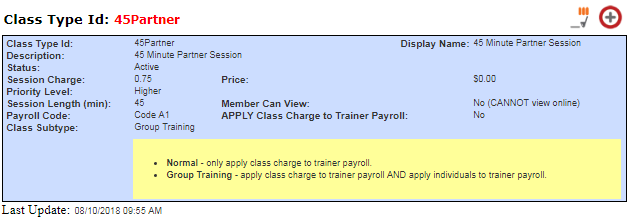
1. Create Partner Session Class Type
- Functions -> Classes -> Add Type
- Enter the Class Type ID (limited to 10 characters, no spaces or special characters)
- Enter the Display Name
- Enter a Description
- Session Charge defaults to 1.00. Update this to 0.50 for 30 session charges or 0.75 for 45 minutes.
- Set Priority Level, if desired
- Enter the Session Length 30 or 45 minutes. (**Note. Create two Partner Session Class Types for each session length)
- Select 'Group Training' under Class Subtype. (This will pay the Trainer the incremental value entered in their Details page under One-on-One Session and Group Training Payroll
2. Scheduling the Partner Session Class Type
- Quick Functions -> Sched Matrix.
- Follow the steps for adding a class. Adding a Class to Scheduler
3. Add Members to Partner Session appoinment.
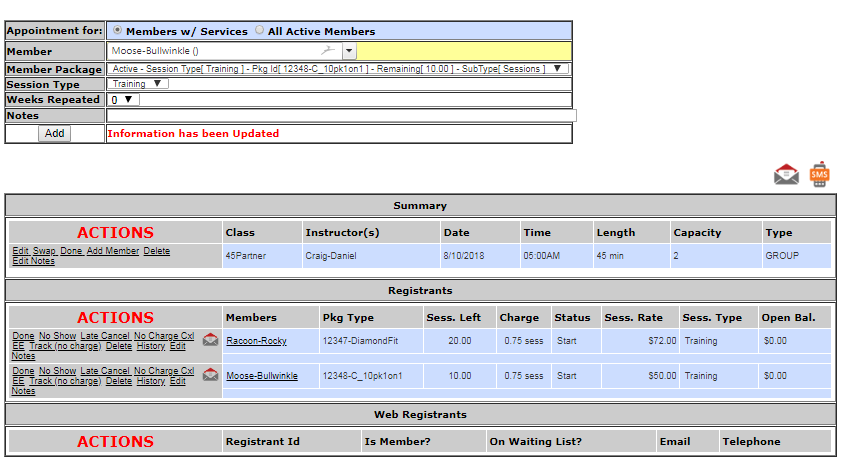
4. When sessions are completed, they will deplete appropriately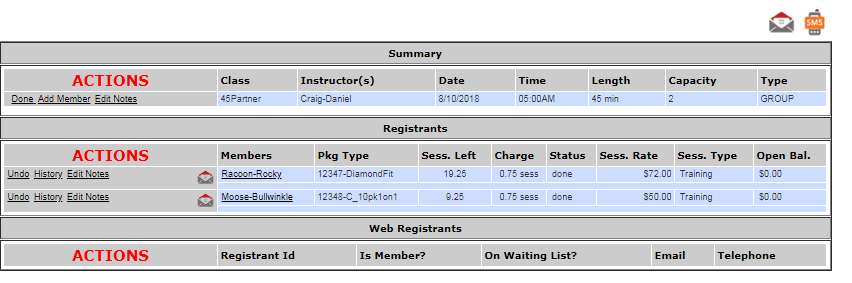
5. Trainer Details

The session rate for Rocky Racoon is $72. The Trainer will receive 50% or $72 = $36. If Rocky trains for 45 minutes, the Trainer will receive $27.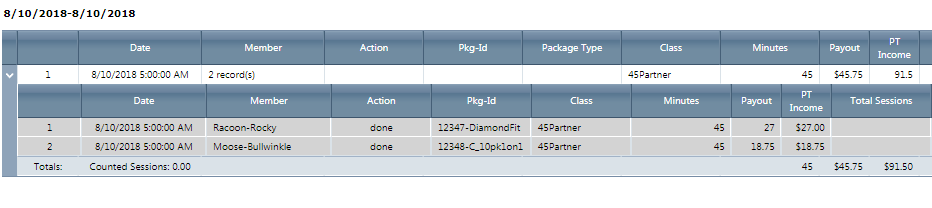
Comments
0 comments
Please sign in to leave a comment.