An Income Category is similar to a Chart of Accounts in accounting. A Chart of Accounts (COA) is a financial organizational tool that provides a complete listing of every account in an accounting system. An account is a unique record for each type of asset, liability, equity, revenue and expense.
Income Categories in Shape can be used across all 3 revenue streams (Memberships, Services and Point of Sale items).
Examples of Income Categories are Memberships, Term Memberships, M2M Memberships, Family, Couple, Individual, Military, Corporate, Personal Training, Group Exercise, Online Sales, Apparel, Beverages, Supplements, etc.
 You should add the Income Categories before creating your Memberships, Services and Products. It will save you from editing these types later.
Add Income Category
- Tools -> System Settings -> Field Definitions -> Income Categories
- Click on Income Categories to expand the area
- Enter the Category into the blank field at the top of the list and click 'Add New'
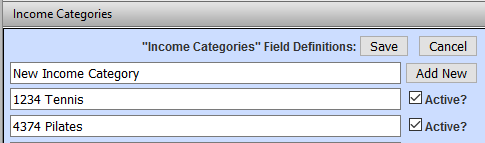
- The Income Category will now be available for you to select when creating your Memberships, Services and Products.
Comments
0 comments
Please sign in to leave a comment.