DRIP Email Marketing is a marketing strategy that sends, or "drips," a pre-written set of email messages to customers or prospects over time.
The timing of the messages is triggered by a pre- determined action. (For example after a membership is purchased, you can drip email your new customer saying, "Come in and schedule your first PT session".)
To create a Drip Email Template:
Go to Functions -> Marketing -> Email and select View Email Template or Add Email Template from the drop down.
- View Email Template - You can use an existing email template to use as a drip. You can turn the 'New Member Welcome' email into a drip after adding customized text or images that will send "1" day after purchasing a new membership;
- Add Email Template - You can create a new email template with customized text and/or images.
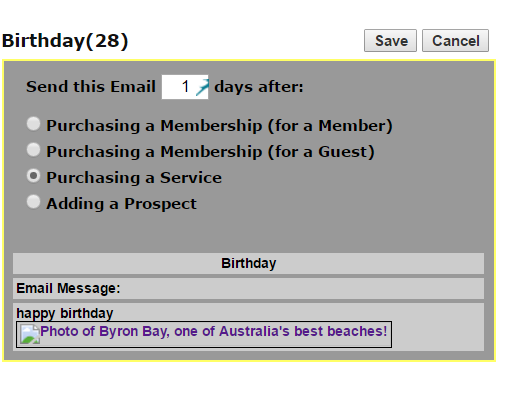
Whether you are using an existing template or creating a new template, click the 'Drip Email' link from the Actions column.
Select the number of days after the 'trigger' the email should be sent. The triggers are:
- Purchasing a Membership (for a Member)
- Purchasing a Membership (for a Guest)
- Purchasing a Service
- Adding a Prospect
“What do I do if I want to send the same email more than once at different day counts?”
- Add New Template
- Copy and paste the email to create a new template, mark it -2
- Set the new date and trigger
Example:
- Set drip details for -New Member Welcome to- 1 day after new membership is open.
- Next, copy and paste the same email message into a new template called- New Member Welcome- 2 and set it to go out 7 days after new membership is open.
- This way they will get the email reminder 1 day after their membership is opened and then again 7 days after it is opened.
Comments
0 comments
Please sign in to leave a comment.