There are two settings you can use to control when a Member can begin signing up for classes.
1. On the Service Type
Max Days for Advance Booking. With this setting, you can set the number of days before the class online sign up will be open. This setting is service package specific. Use this setting for classes that fill up quickly.
- Find this setting by navigating to Quick Functions -> Services, Quick Menu -> Types.
- Find the service you wish to edit and click the Edit link.
- Scroll down to 'Max Days for Advance Booking' and enter the days in whole numbers.

If the member tries to register for a class that is beyond the x days, you will receive the following message:
“Appointment cannot be scheduled, because date is beyond max [x] days for advanced booking.”
2. In System Settings
You can set the days for advance booking under your Tools -> System Settings -> Scheduled Appointment Settings -> Member Future Class Registration Cut‑Off Days. Here you enter the number of days before the class they can start to register. (This one has a sister setting - Member Future Class Registration Cut‑Off Time of the Day). Since it is a system setting, it will apply to all appointment scheduling.
Note~ The Service Type setting for 'Max Days for Advance Booking' will override the System Setting.
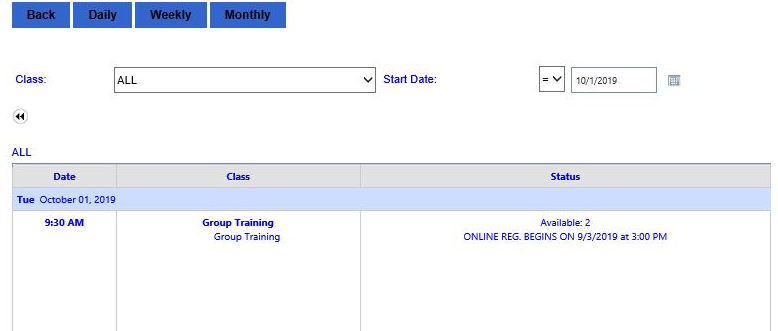
The message the member will see a message on the class itself and display the date and time registration for the class opens.
Comments
0 comments
Please sign in to leave a comment.